仪器型号及序列号定位器

目前本页还没有简体中文版。您可以使用Google的翻译服务查阅 自动翻译。 我们不负责提供该项服务,而且翻译结果未经过我们的检查。
如果您需要更多帮助,请 联系我们

网页内容下载致电当地的办事处 在线联系我们

invia close 300This page is designed to help customers identify the type of any Renishaw Raman spectrometer, and to find the serial number on that instrument. The serial number label contains a unique identification number for your system. It is either a five digit number preceded with the letter H or G (e.g. H24985), or 5 characters consisting of a number, a letter frollowed by three numbers (e.g. 2Y986).

The system serial number and manufacture date should be quoted in all correspondence with Renishaw. The location of the serial number label is dependant on the type of Renishaw Raman spectrometer.

inVia series Raman instruments

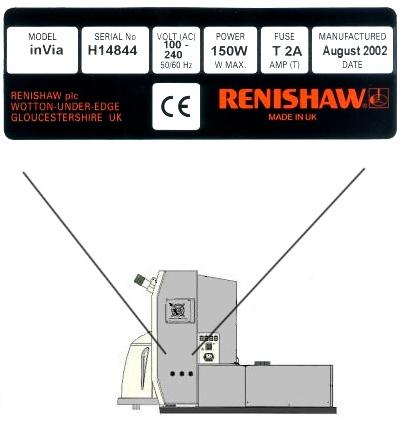
The serial number label is located on the right hand side of the instrument near the mains connector bracket. An example label is shown in the image below. This applies to inVia reflex and non-reflex models.

inVia Serial number location

inVia series Raman microscope

inVia or inVia Reflex Raman microscope?

inVia Raman microscope

Incorporates manual Leica double microscope podules

inVia 300

inVia Reflex Raman microscope

Incorporates automated orange and white microscope podule

inVia reflex 300

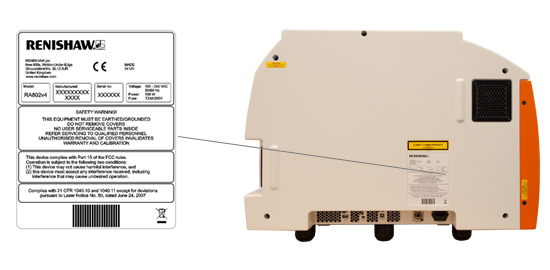
RM and RA series instruments

If running WiRE™ 1 software it is possible to find the serial number using the WiRE™ software, as detailed in Software type and version finder.

RM series instruments

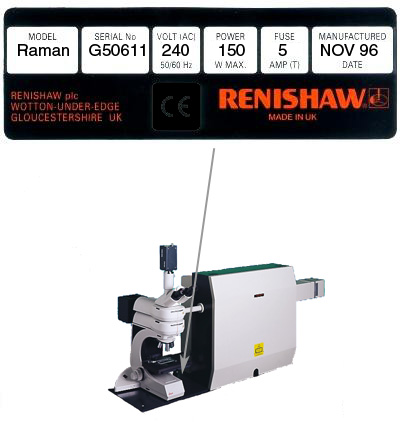
The serial number label is located on the left hand side of the instrument, facing the microscope and beneath the mains connector bracket. An example label is shown in the image below.

RM 1000

inVia series Raman microscope

System 100 (RA100) series instruments

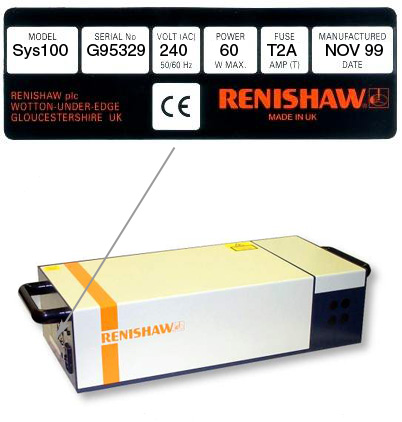
The serial number label is located on the left hand side of the instrument, facing next to the fan exit and mains connector bracket. An example label is shown in the image below.

RA100 Raman Analyser

  System 100 (RA100) Raman Analyser

后续步骤

如果您需要了解更多信息或者询价, 或有其他要求,可以直接联系当地的雷尼绍办事处